---
title: "Remote Work Policy Template"
description: "A remote work policy in one Word document: who may work remotely, hours, equipment and expenses, security, monitoring, and review, with an acknowledgment to sign."
---
# Remote Work Policy Template
Workfolio team
October 9, 2026
This template is the whole remote work policy in one Word document. Download it with the button under the policy.
*Remote work policy: replace each bracketed part with your company's own words.*
**Remote work policy**
Company: \[company name]. Effective: \[date].
This policy applies together with \[the legal requirements that apply where the employee works, in your own words].
**Who may work remotely**
Remote work is open to \[roles or teams]. An employee starts remote work when \[approver] approves the arrangement in writing. The request names the place of work, the days worked there and the hours available. \[Approver] answers within \[number] business days. An arrangement ends or changes with \[notice period] notice, confirmed in writing.
**Working hours and availability**
Scheduled hours are \[hours per week] a week, on \[days], from \[start time] to \[end time], \[time zone]. During these hours you are available on \[channels] and reply within \[response time]. A change to scheduled hours is agreed with \[manager] in writing before it starts.
**Recording time**
Record the start time, end time and any unpaid meal break over \[30] minutes for each workday, in \[timesheet method], by \[day and time] each week. All work time is recorded and paid, including work outside scheduled hours, whether or not a manager asked for it. A rest break of 20 minutes or less is work time. Record it as hours worked, not as a break.
**Equipment and expenses**
The company provides \[equipment the company provides]. You provide \[equipment the employee provides, or none]. The company reimburses \[expense categories] that you incur for work. Send each claim with its receipt within \[number] days through \[claim method]. The company pays claims by \[payment date].
**Security and data**
Do company work only on \[approved devices and accounts]. Keep company files in \[approved storage], not on personal devices or in personal accounts. Lock your screen whenever you leave your device. Report a lost or stolen device, or any possible exposure of company data, to \[contact] within \[number] hours.
**Monitoring**
The company monitors \[tools used, or none] to record \[what is recorded]. It does not record \[what is not recorded]. Each employee is told in writing, before monitoring starts, through \[how employees are told]. The notice says what is recorded, who sees it, and how long it is kept.
**Review**
\[Role] reviews this policy every \[period]. Each change is sent to every employee in writing \[number] days before it takes effect. Questions about this policy go to \[contact].
**Acknowledgment**
I have read this remote work policy and I will follow it.
Employee name: \[name]. Employee signature: \[signature]. Date: \[date].
[Download the template](/templates/remote-work-policy-template.docx)
## Adapt each bracket to where employees work
Fill in each bracket with your company’s own words, and delete any part that does not apply. A bracket left in place is a rule no one can follow. Name approvers and reviewers by role.
Check the hours, break, expense and monitoring rules where each employee works. In India, the hours and work-from-home rules are in one section below. This post names no rule for any other Asian market, so check those rules there. For US employees, the federal rules behind the clauses are in one section below, and each state adds its own.
## Record each day’s start, end and breaks
The recording clause asks for the start time, the end time and any unpaid meal break over \[30] minutes on each workday. In Workfolio, the employee does this on the timeclock: clock in when the day starts, take a break with Take a Break, and clock out at the end.
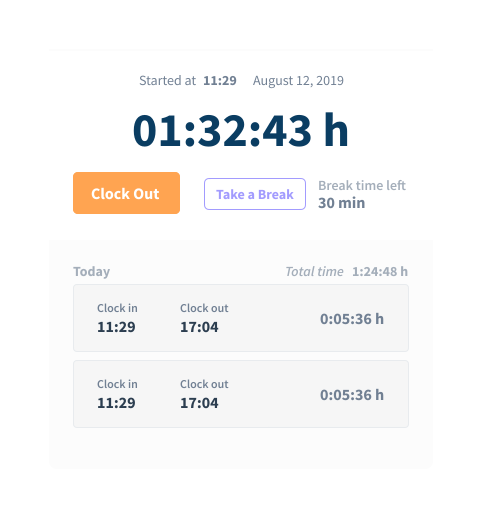
*The timeclock: the start time, Clock Out and Take a Break, and the entries under Today.*
Time taken with Take a Break counts as break time. For a US employee, a rest break of 20 minutes or less taken with Take a Break is still paid as hours worked, as the break clause says.
## Check hours against the schedule
Open the day’s timeline first. It shows each person’s day, broken down to productive time, idle time and break time. Then read the totals card and compare its hours with the schedule.
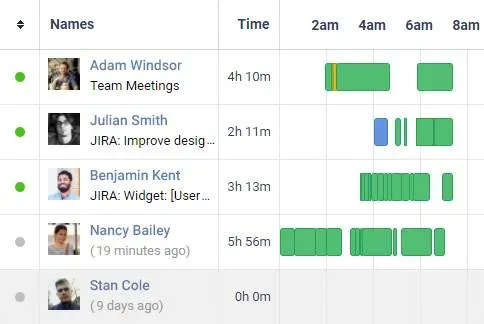
*Employee activity timelines: one row per person.*
The totals card splits worked time into productive, unproductive and neutral. Idle time and break time sit beside the worked hours, not inside them.
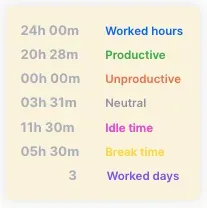
*The totals card: idle time and break time beside the worked hours.*
## Report unscheduled work so it is paid
The recording clause has employees report work outside scheduled hours, and the company pays for all work time recorded, whether or not a manager asked for it. Workfolio tracks only while the employee is clocked in, so the monitoring record holds only clocked-in time. That time may fall outside the scheduled or reported hours. Check it and count the time that was worked, as the rules below require.
## Name what is recorded and what is not
[Workfolio’s work from home monitoring](/work-from-home-monitoring) tracks productive hours of your employees via their computer activity. The app view lists apps labelled productive or neutral, beside a donut chart of time by app.
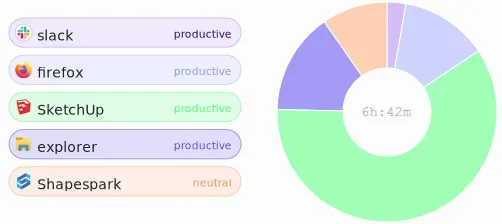
*The app view: apps labelled productive or neutral, beside the time by app.*
Workfolio takes screenshots of the employee’s active window, and images can be blurred for privacy.
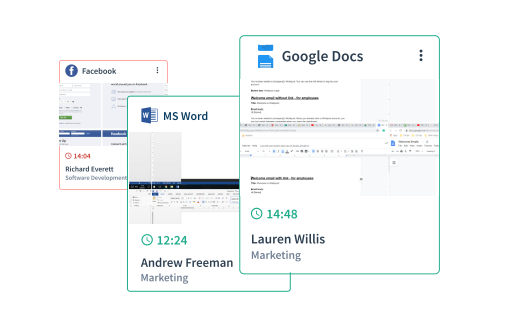
*Blurred captures: the window contents are blurred. The app name, employee name, team and capture time stay readable.*
Name the tool and what it records. Write each “does not record” line only after you have checked it in the tool. This post does not cover the law on monitoring; check it where each employee works.
## Issue the policy and get it signed
Tell each employee in writing before monitoring starts. The notice says what is recorded, who sees it, and how long it is kept. Each employee signs the acknowledgment at the end of the policy.
## US rules the clauses follow
The federal rules in [29 CFR Part 785](https://www.ecfr.gov/current/title-29/part-785) make work the employer did not ask for work time (785.11). Time the employer knows of, or has reason to believe is being worked, counts as hours worked (785.12). Rest periods of about 5 to 20 minutes count as hours worked (785.18).
For breaks at home, the Wage and Hour Division’s [Field Assistance Bulletin 2023-1](https://www.dol.gov/sites/dolgov/files/WHD/fab/2023-1.pdf) says that when employees take short breaks of 20 minutes or less, the employer must treat them as compensable hours worked “regardless of whether the employee works from home”.
The Wage and Hour Division’s [Field Assistance Bulletin 2020-5](https://www.dol.gov/sites/dolgov/files/WHD/legacy/files/fab_2020_5.pdf) describes one way to show reasonable diligence: a reasonable reporting procedure for non-scheduled time, with pay for all reported hours. A reporting process is not reasonable diligence where the employer “prevents or discourages an employee from accurately reporting the time he or she has worked.”
Under [29 CFR 531.35](https://www.ecfr.gov/current/title-29/section-531.35), when the employer requires an employee to provide tools of the trade for the employer’s work, the Act is violated in any workweek in which the cost of those tools “cuts into the minimum or overtime wages required to be paid him under the Act.” In California, [Labor Code section 2802](https://leginfo.legislature.ca.gov/faces/codes_displaySection.xhtml?lawCode=LAB§ionNum=2802) requires the employer to reimburse all necessary expenses the employee incurs in direct consequence of the job, so the reimbursement clause must cover them.
## India rules the clauses follow
In India, a worker’s day is capped at eight hours in an establishment of ten or more workers. The [Occupational Safety, Health and Working Conditions Code, 2020](https://egazette.gov.in/WriteReadData/2020/222112.pdf) is in force; its section 25(1)(a) says no worker may be required or allowed to work more than eight hours in a day. Managers and higher-paid supervisors are not workers under the Code. How the eight-hour cap fits with a state’s own daily limit is not settled. Whether a rest interval is paid is not settled either.
For an establishment of 300 or more workers, the [Industrial Relations Code, 2020](https://www.labour.gov.in/static/uploads/2025/07/682a44b5426bff2c1f4943ee1b2fd566.pdf) applies its standing-orders chapter. Until the establishment’s own orders are certified, the model orders, the [Service Sector Standing Orders, 2026](https://egazette.gov.in/WriteReadData/2026/272341.pdf), are deemed to be adopted. Whether the Centre’s or a state’s model orders apply to an ordinary private office is unsettled. Under those model orders, paragraph 9 lets the employer allow work from home, at a remote location or in a virtual workplace, for periods the employer sets, subject to the conditions of appointment or agreement with the worker. Below 300 workers, no statutory standing orders apply.
A state may set its own daily limit, so check each state’s rule where the employee works.
## Judge the work by its output
Output is the final test of remote work. The hours and monitoring records are one input to judging it. You know what the team is working on, which tasks had deadlines, and who was on leave or in a client meeting. Before you decide that work was missed, ask the employee what the week held.
Previous Blog :-
[How to tell your team you are starting employee monitoring Workfolio team October 9, 2026](/blog/how-to-tell-your-team-you-are-starting-employee-monitoring)
Next Blog :-
[Timesheet Template Workfolio team October 9, 2026](/blog/timesheet-template)
## Get Started with Workfolio Today!
Unlimited Features. No Commitment. Free to Try.
[Start your 14 day free trial](https://app.getworkfolio.com/signup/pro)
## What Our Users Says
> Workfolio has transformed our team’s productivity! The ease of tracking and reporting has streamlined our workflow and saved us significant time and money.
Raha West
Operations Manager at TechCorp