
Can you put monitoring software on a contractor's or employee's own computer?

Yes, if the worker agrees in writing, and only to the work account and working hours. On a company laptop the question is simpler. On the worker’s own computer, the agreement comes before the install.
Monitoring data shows how a day went. It does not show whether the work was worth paying for.
Settle who the worker is
The answer decides which document you write. For an employee on a personal machine, the device rules go in a written policy the worker signs. For a contractor, the terms go in the contract, next to the payment terms.
A title in the agreement does not settle it. How the law classes a worker varies by country, so check it where the worker works before you choose between the two documents.
Whose computer it is
On a company laptop, the device was issued for the work. Tell people what runs and when on the day it is handed over.
The worker’s own computer also holds family accounts, banking and, for a contractor, other clients’ work. Ask for the work account and the working hours only. Some workers will refuse. If the work needs that machine, issue a company device instead.
What the law allows on a worker’s own computer varies, so check the rule where your staff work. Get the consent in writing either way, and write it to the work account and the working hours. Nothing the worker did not agree to is covered.
What to put in writing
Tell the team openly before anyone signs: what runs, on which machines, and why. Then write the same words into your office policy, so the device rules are one rule for everyone and not a private deal with one person.
Before the software goes on, each worker’s agreement settles five things:
- which device and which user account are covered
- what is collected: activity, screenshots, or both
- when: the working hours only, never the rest of the day
- who on your side can see the data
- how either side ends the arrangement
Set it up with the worker
Workfolio’s work from home monitoring tracks productive hours of your employees via their computer activity. Install the desktop app on the worker’s computer only after the agreement is signed.
Our desktop app makes it easy to clock in, clock out or take a break whenever needed. Workfolio tracks only while the employee is clocked in.
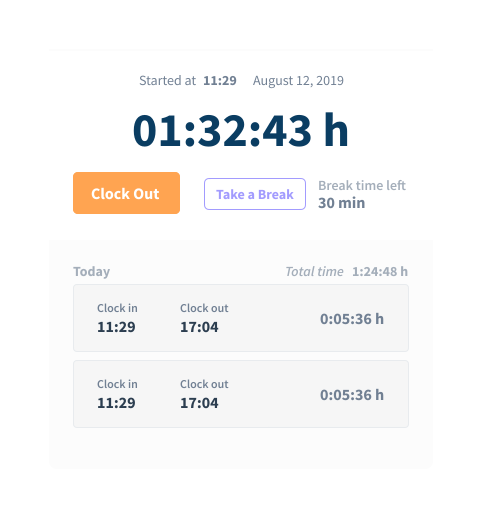
Blur the screenshots, and show the worker one
Workfolio captures the whole screen of every display, not the active window. On the Basic plan a screenshot is taken every 10 minutes. On the Pro plan an admin sets the interval, from every minute to every hour. An admin can blur each whole capture, for the organisation or for one person. Set how often screenshots are taken and the blur before install, and show the worker one blurred screenshot, so they know what is captured.
Read the team’s hours first
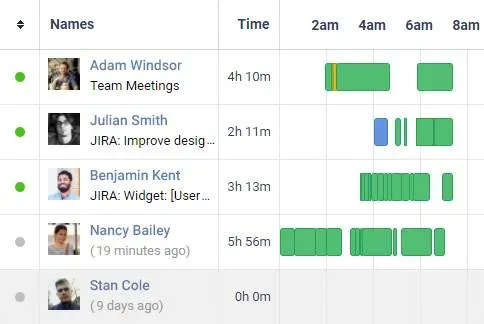
The daily timeline is a visual log of daily activities for every employee, split into productive time, idle time and break time. Read it for the team first: check that each row starts and ends inside the agreed working hours. A row outside them means the setup needs fixing, not that the person did something wrong.
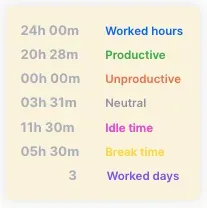
Workfolio tracks employee work time through computer activity, for worked hours that can feed payroll. The totals card counts the hours worked, split into productive, unproductive and neutral, with idle time inside them and break time beside them. It counts where the hours went, not how well the work was done.
Compare any one person only with their own earlier weeks, never with a colleague. If a figure moves, ask the person before you read anything into it.
Where to start
Settle whether each worker is an employee or a contractor. Tell the team, put the device rules in your office policy, and get each worker’s consent in writing to the work account and the working hours. Then install, show a blurred screenshot, and read the team’s hours for the first week. The delivered work stays the final test.

