Skip to content

Time tracking software for teams

Employees clock in and out in the desktop app. While they are clocked in, timesheets fill in automatically from computer activity.

Clock In and Out
Productive, Idle and Break Time
Windows, Mac and Linux
Start tracking time - it's free!
Free for unlimited users
Timeclock showing elapsed work time, clock-out and break controls, and time entries
01

Clock in and out in the desktop app

Employees clock in, clock out, or take a break from the desktop app whenever needed. The desktop app runs on Windows, Mac, and Linux. Workfolio tracks only while they are clocked in, and fills in their timesheets from computer activity. In stealth mode, clock-in and clock-out happen automatically.

Employee activity timelines with coloured time blocks
02

Each day split into productive, idle, and break time

A daily timeline for every employee, split into productive time, idle time, and break time. Time taken with Take a Break counts as break time. Periods of inactivity are found and logged automatically.

Totals card: 24h 00m worked, 20h 28m productive, 3h 31m neutral, 11h 30m idle, 5h 30m break time and 3 worked days
03

Timesheets with each employee's totals

Each employee's totals show hours worked, productive, neutral, idle, and break time, and days worked.

04

Export timesheets to CSV or Excel on Pro

Export your team's timesheet data to CSV or Excel and calculate payroll the way you want it. Export is on Pro; Free does not include it.

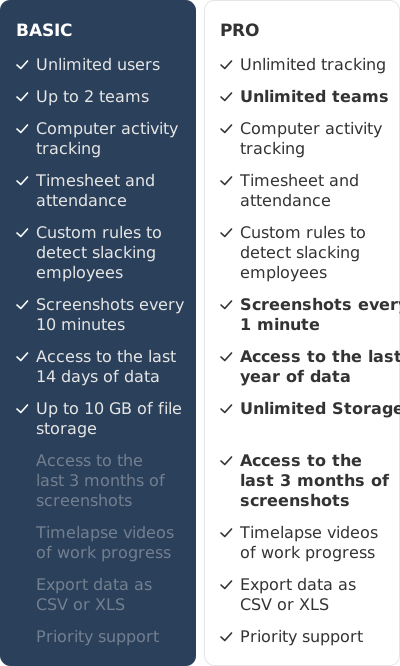
Basic and Pro plan features side by side, with the four Pro features Basic lacks struck through in Basic
05

What Basic gives for free, and what Pro adds

Basic is free and includes unlimited users, up to 2 teams, computer activity tracking, timesheet and attendance, and the last 14 days of data, with 10 GB of file storage. Pro adds unlimited tracking and teams, the last year of data, unlimited storage, the last 3 months of screenshots, timelapse videos, export as CSV or XLS, and priority support. Once Basic's 10 GB is used up, tracking is limited to timesheets.

Apps labelled productive or neutral beside a donut chart of time by app, 6h:42m in the centre
06

Monitor the apps your team uses, in realtime

Working hard or browsing social media? Always know how your employees use their time. Track app and website usage, and overall productivity.

“Workfolio helped us gain reassuring proof of work in changing situations. Surprisingly, our team productivity improved 28% while working remote.”
Evan Kennedy
KreativeStudio
Trusted by 2500+ remote and hybrid teams.
ALSO FEATURED IN
Business InsiderTechCrunchHackerRank

Start generating timesheets automatically

Unlimited Users. Cancel Anytime. Free Forever.

Create free account

Freeforever!

Unlimited users
Up to 10 GB of file storage
No credit card needed
Optional Upgrades →