
Timesheet Template

A timesheet records the hours a person worked in a week. This one is an Excel workbook. Download it with the button under the layout below, type the employee’s name, the first day of the workweek and its start time, then type each day’s start, end and unpaid break. The hours for each day and the week’s totals fill in from what you type.
The sheet records the hours a person reports, not the work itself. Output is the final test of the work, so judge the team on what it ships.
Weekly timesheet
Employee: [name]
Workweek starts: [date] at [time]
| Day | Date | Start | End | Unpaid break over 20 min | Hours worked |
|---|---|---|---|---|---|
| (day) | (date) | [start] | [end] | [break] | (hours) |
| (day) | (date) | [start] | [end] | [break] | (hours) |
| (day) | (date) | [start] | [end] | [break] | (hours) |
| (day) | (date) | [start] | [end] | [break] | (hours) |
| (day) | (date) | [start] | [end] | [break] | (hours) |
| (day) | (date) | [start] | [end] | [break] | (hours) |
| (day) | (date) | [start] | [end] | [break] | (hours) |
Week total: (break minutes), (hours). Days worked: (count)
Employee signature: [signature]. Date: [date]
Approved by: [name]. Date: [date]
What the US rules require
In the United States, the federal rule for non-exempt employees requires a record that shows the employee’s name, the day and time the workweek begins, and the hours worked each workday and each workweek (29 CFR 516.2). A rest period of about 5 to 20 minutes counts as hours worked (29 CFR 785.18), and the Wage and Hour Division says this holds wherever the employee works, at home included (Field Assistance Bulletin 2023-1). A time card or sheet that shows each day’s starting and stopping times is kept at least two years from its last entry (29 CFR 516.6).
What India’s rules require
India’s Code on Wages, 2019, which is in force, requires an employer of an establishment it covers to keep a register of the persons employed, a muster roll and wages, and the other details the rules prescribe (Code on Wages, 2019, section 50(1)).
The Code on Wages (Central) Rules, 2026, which are in force, name that register the Attendance Register-cum-Muster Roll, Form IX. It records each day’s date and time of attendance, in and out, on paper or electronically, and is kept for five years after the date of its last entry.
Which rules apply to an employer is not settled, so check the rules of each state where your employees work for the register’s form and how long it is kept.
Whether a rest interval is paid time is not settled in India, so the US rest rule above does not settle it there.
Type the start, end and break for each day
Type the employee’s name in full in Employee, as it is used for Social Security recordkeeping. Type the first day of the workweek in Workweek starts, with its start time beside it. The rows run for seven days from that day and fill in their own dates, even across the end of a month.
For each day the person worked, type these three things:
- Start, as a clock time with AM or PM, such as 9:00 AM.
- End, as a clock time with AM or PM, such as 5:30 PM.
- Unpaid break over 20 minutes, as a number of minutes, such as 30 for a half-hour meal. Leave the cell empty when there was no such break.
Hours worked fill in as decimal hours, so 7 hours 30 minutes shows as 7.50. A day with no start or end stays blank and does not count toward the total.
A rest of 20 minutes or less is hours worked, so do not enter it as a break. A shift that ends after midnight counts on the day it starts: a start at 10:00 PM and an end at 2:00 AM give four hours.
Type only in the shaded cells. Typing over a formula in an unshaded cell replaces it, and the totals no longer follow the times.
Check the totals before you sign
The week total row adds the unpaid breaks in minutes and the hours worked. Days worked counts the days that have hours. Read both totals against the week before you sign. If a total is wrong, check that day’s start, end and break first.
Sign after the totals are read
The employee signs and dates the Employee signature line. The person who approves the hours signs and dates the Approved by line after reading the totals against the week, not only signing the sheet.
Keep one file for each worker and week
Save each week under a new name, such as the worker’s name and the week’s first date, and keep a worker’s weeks together in one folder. In the United States, keep each sheet at least two years from its last entry, as the rules above set. If the employee fills in the sheet on their own computer, ask them to type only in the shaded cells and to send it back with the week’s date in the file name.
Check the rules where each employee works
Outside the United States, each country sets its own answers to three questions: what a time record must show, how long it is kept, and whether short breaks count as hours worked. India’s answers are in the section above. Check those answers for each other country where your employees work before you use the sheet there.
Use what your team tells you
A sheet with few hours does not show that the work was not done, and a sheet with many hours does not show that it was. Use what you know of the week, such as deadlines and leave, and ask the person what it held: the days on a client site, on calls, or away from the computer. Change a time only when the person agrees it was wrong.
When the hours and the work do not match, settle it with the person before you approve. Correct the times on the sheet, then have the employee sign after the correction.
Track the hours in Workfolio instead of typing them
Typing the times needs only a spreadsheet. Workfolio’s timesheets page headlines “Accurate timesheets from verified working hours”.
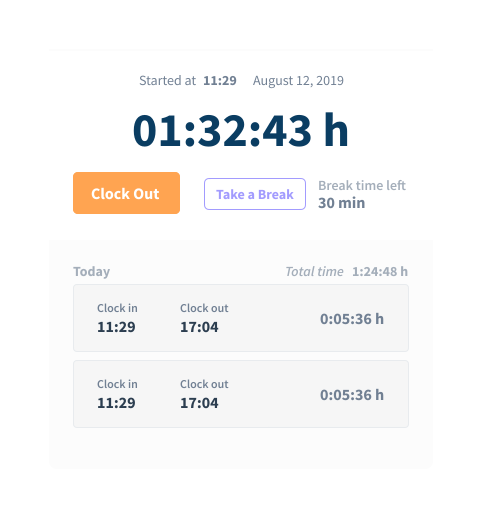
Each person clocks in and out in Workfolio’s desktop app, which makes it easy to clock in, clock out or take a break whenever needed. Take each day’s start and end from the clock-in and clock-out times on the timeclock.
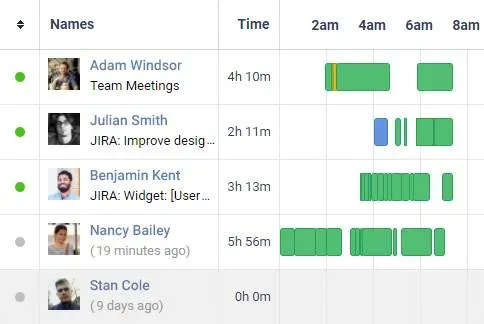
The daily timeline is a visual log of daily activities of every employee, broken down to productive time, idle time and break time.
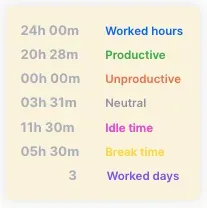
The totals card shows worked hours, split into productive, unproductive and neutral. Idle time and break time sit beside the worked hours, not inside them, and the card shows the worked days.
Export timesheet data to CSV or Excel, and calculate payroll the way you want it.
Start with one week
Download the workbook and fill in one worker’s last full week. Check its totals against that week and the work before you sign, then save it under the worker’s name and the week’s first date.

