
Employee Monitoring Policy Template

A monitoring policy tells employees what is recorded about their work, why, who sees it, how long it is kept, and how to ask about it. This post gives you one as a Word document. Download it with the button under the policy below, replace each bracketed part with your company’s answer, and delete any part that does not apply.
Output is the final test of the work. Monitoring is one input to judging it. The policy should say what that input is for, and no more.
What the policy holds
The policy covers who it applies to, what is monitored, why, when, who sees the data, how long it is kept, how an employee asks about it, and how changes reach employees. It ends with an acknowledgment the employee signs. The text below is the whole policy.
Employee Monitoring Policy
[Company name]. Effective [date].
Purpose
This policy says what [Company name] monitors, why, when, who sees the data, how long it is kept, and how you can ask about it.
Who it covers
This policy covers [who it covers, for example: every employee who works on a company device or account].
What we monitor
We monitor [each activity, for example: time in each application and website] on [devices and accounts, for example: company laptops and the company email account]. [If screenshots are taken, say how often and of what.]
We do not monitor [what is excluded, for example: personal accounts and personal devices].
Why we monitor
We monitor to [purposes, for example: record hours for payroll and check that work is delivered]. We use the data for those purposes only.
When we monitor
Monitoring runs [when, for example: during working hours on company devices].
Who sees the data
Only [roles, for example: your manager, the HR lead, and the payroll administrator] can see monitoring data.
How long we keep it
We keep monitoring data for [period, for example: 90 days] from the day it was recorded, then delete it. Where a legal requirement sets a longer period for this data, we keep it for that period: [the legal requirement and its period, or delete this sentence].
How to ask
Ask what monitoring data we hold about you, or ask us to correct it, by writing to [name or role] at [email address]. We answer within [number] working days.
Changes
We tell you in writing before a change to what we monitor takes effect, and we ask you to acknowledge the changed policy.
Acknowledgment
[Any words a law where you operate requires this notice to contain.]
I have read this policy. I know what is monitored, why, when, who sees the data, how long it is kept, and how to ask about it.
Employee name: [name]
Signature: [signature] Date: [date]
Name what the software records
Name each activity, each device or account, and how often any screenshots are taken, as the software records them. A line that says “all computer activity” tells an employee nothing.
Workfolio’s employee monitoring page says “Track app and website usage, and overall productivity.” Its app view labels apps productive or neutral.
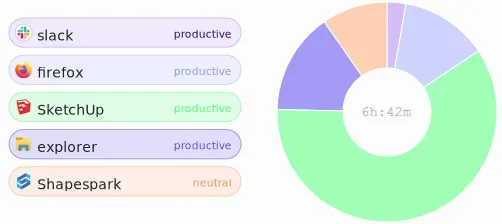
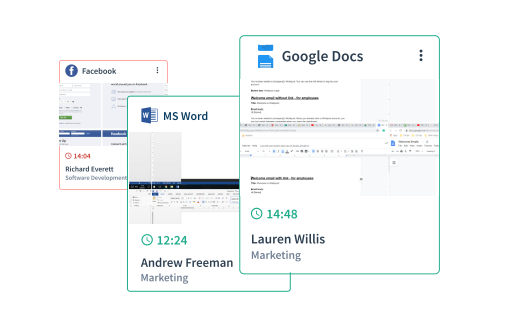
Its screenshots recur: “Screenshot your employees active window recurringly, for up to every 1 minute interval.” It can blur images for privacy. Write the interval you set in What we monitor, and say whether captures are blurred.
Name each use the data serves
The policy says the data is used for the purposes it names, and for no others. Name each use below under Why we monitor.
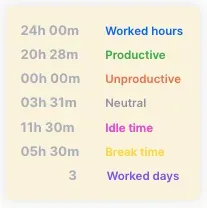
Its page says “Get verified working hours for payroll.” The totals card splits worked hours into productive, unproductive and neutral time, and shows idle time and break time beside them, with the count of worked days.
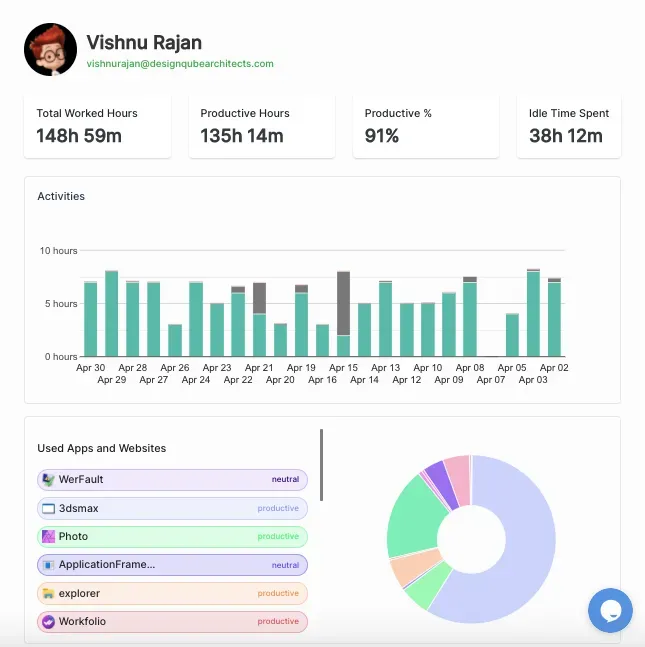
Its page says “Appraise your team members using their work analytics.” The view for one person shows hours worked, productive hours and percentage, idle time, daily hour bars, and the apps and websites used.
Its page says “Customize rules to filter employees who are working less, being idle or engaging in unproductive activities.” The rules violated panel lists the employees each rule flags.
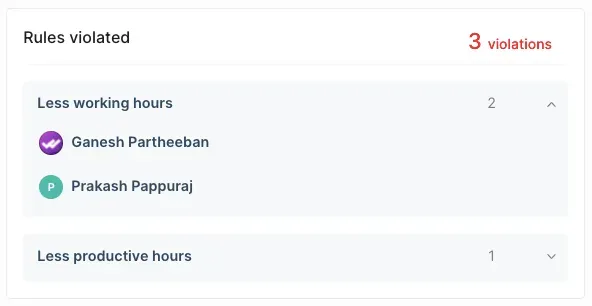
A flag is a reason to look, not a finding. Check the work before you act on one.
Name who can open the data
The overview dashboard shows team counts, risky users, top apps and websites, and top performing teams. Its menu lists Screenshots and Timelapse Videos.
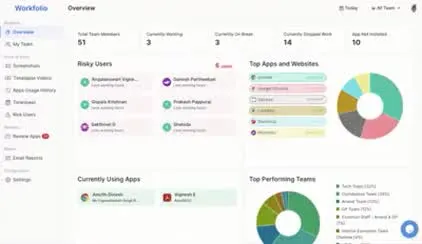
Name the roles that open each view, and no others. No screen shows which roles those are, so check your account before you name them.
Write the parts no screen shows
No screen shows where the interval is set, which devices and accounts are included, how long data is kept, or how an employee asks about it. Write each one as you will run it, and check it before the policy goes out. Workfolio tracks only while the employee is clocked in.
Give the period in days, months, or years. “As long as needed” is not a period anyone can check. Name a person and an address that someone reads for questions.
Check the rules where your employees work
The table gives the rule for each of the five places this post covers.
| Where | What the rule asks for |
|---|---|
| New York | Written notice upon hiring that telephone calls, email, and internet access or usage may be monitored. The employee acknowledges it in writing or electronically, and the notice is posted where employees can see it. The employee must be advised that these communications "may be subject to monitoring at any and all times and by any lawful means." (Civil Rights Law § 52-c) |
| Connecticut | Prior written notice of the types of electronic monitoring that may occur, to each employee who may be affected. A conspicuous posting counts. The statute covers collection of information "on an employer's premises"; check whether that reaches a home worker's device. (General Statutes § 31-48d) |
| Delaware | An electronic notice on each day the employee uses employer email or internet, or a one-time notice that the employee acknowledges in writing or electronically. (19 Del. C. § 705) |
| United States, federal | Interception is lawful where a party has given prior consent, unless it is for a criminal or tortious purpose. (18 U.S.C. § 2511(2)(d)) |
| India | Until 13 May 2027, section 43A of the Information Technology Act, 2000 and the SPDI Rules 2011 govern personal data. Under rule 5(1), a body corporate, or anyone acting for it, must get consent to the purpose in writing before collecting sensitive personal data, such as passwords, bank details, health conditions, or biometric data. Under rule 5(3), it must also take reasonable steps so that the person knows the information is being collected, why, who will receive it, and the name and address of the agencies that collect it and keep it. From 13 May 2027, the duties in the Digital Personal Data Protection Act, 2023 begin, under the commencement notification. Its section 7 permits a Data Fiduciary to process personal data for the uses it lists, including "the purposes of employment or those related to safeguarding the employer from loss or liability". Its section 8(7) requires the data to be erased once "the specified purpose is no longer being served". |
Where New York applies, put its sentence in the acknowledgment part in place of the bracket. Check the rule where your employees work before you use the policy. This post cites no law for any other place.
Tell the team first
Tell the team before monitoring starts, in writing, and give them the policy. Say what starts, on which devices and accounts, from what date, and why. Answer each question before the first day, in the policy or in a reply.
Have each employee sign the acknowledgment part, and keep the signed copy. Where New York applies, also post the notice where staff can see it. Do not fill in an employee’s signature or date for them.
Keep it current
Review the policy when the software changes, when a monitored activity changes, and when a rule that applies to you changes. Tell employees in writing before a change takes effect, and have each person acknowledge the new version. A signed page does not cover a later version. Keep each signed acknowledgment with the version it covers, and answer each request about monitoring data within the time the policy gives.

