
How to pay remote hourly staff and contractors from tracked time

Paying tracked hours takes five steps: sort each day into stretches that count as work, add the hours workers reported that the record does not show, check the day against output, approve each worker’s hours for the pay period, then pay them and keep the daily and weekly totals.
The record shows what a computer did and when. It does not decide what you pay, and it does not show that the work got done. Output is the final test of the work.
Sort each day into stretches the rules count as work
Workfolio’s timesheets page describes verified working hours for payroll, from computer activity. Its desktop app makes it easy to clock in, clock out or take a break whenever needed. Here is the desktop app’s clock:
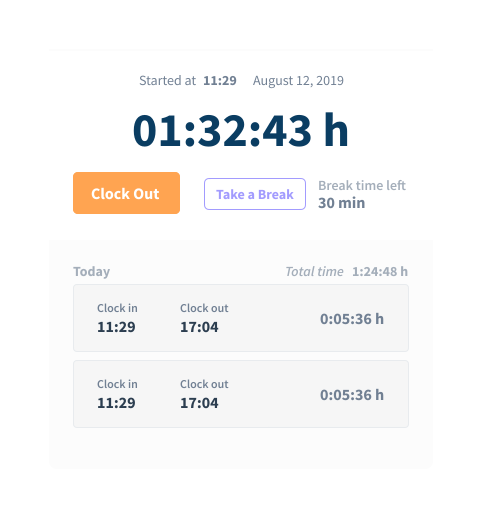
Then read the day on the timeline. It is a visual log of each employee’s day, broken down to productive time, idle time and break time. Time taken with Take a Break counts as break time.
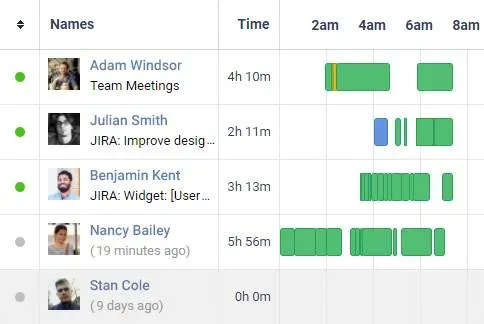
Idle time on the timeline is not a pay category. Under US federal rules, employers must pay nonexempt workers for all hours worked (DOL’s telework bulletin), and this table says which stretches count:
| Stretch of the day | Hours worked |
|---|---|
| Short rest break, about 5 to 20 minutes | Yes |
| Meal break with any work during it | Yes |
| Longer stretch away from work, worker completely relieved from duty | No |
| Longer stretch away from work, worker not completely relieved | Yes |
A rest break of about 5 to 20 minutes must be counted as hours worked (29 CFR 785.18). Time taken with Take a Break counts as break time. For a US employee, a rest break of about 5 to 20 minutes taken with Take a Break is still paid as hours worked. A meal break counts if the worker has to do any duties while eating (29 CFR 785.19). A longer stretch away from work counts as hours worked unless the worker is completely relieved: told in advance that they may leave and will not have to start until a specified hour, and given time long enough to use for their own purposes (29 CFR 785.16).
These are US federal rules, and a state’s may differ. In India, the Occupational Safety, Health and Working Conditions Code, 2020 is in force: no worker may be required or allowed to work for more than eight hours in a day, in an establishment of ten or more workers. A state’s Shops Act may set its own daily limit, so check the state where each employee works.
Under the Code on Wages, 2019, a deduction for absence may be made only for absence from the place or places the terms of employment require the worker to work (s.20(1)). Whether time worked from home is absence depends on those terms, and how the section applies to home work is unsettled. Whether a rest interval is paid time is also unsettled: no primary text this post cites says so.
In other Asian markets, check your country’s rules on paid working time, and on rest and meal breaks, before you use this table. This post cites no source for the rules of those markets.
Count work nobody asked for
Work a worker does without being asked still counts. The federal rule says that “Work not requested but suffered or permitted is work time” (29 CFR 785.11). If you know or have reason to believe the work is being done, you must count the time, and that includes work at home (29 CFR 785.12). DOL’s telework bulletin applies the same rule to remote work: the time counts whether the worker is at your location or teleworks from another location.
Plan for the record to be read. DOL’s 2020 reporting bulletin says that if it could be practical to consult records outside your timekeeping procedure, those records would form the basis of constructive knowledge of hours worked. Work done outside clocked-in time is not in the record. When you learn of such work another way, count those hours under the rules above and pay them in the next pay run.
Set a reporting procedure that pays every reported hour
Let workers report hours outside their schedule through a procedure you set up. The 2020 bulletin says one way to show reasonable diligence is a reporting procedure for unscheduled time under which every reported hour of work is paid, even hours you did not request. The procedure does not count if it prevents or discourages accurate reporting, and a worker cannot waive the right to compensation under the Fair Labor Standards Act.
Then approve each worker’s hours for the pay period before payroll runs. Approval checks the day against the rules and the reports, and it does not remove a reported hour. If a stretch was logged wrongly, settle it with the worker and write down the change.
For employees covered by the Fair Labor Standards Act’s minimum wage and overtime rules, 29 CFR 516.2(a)(7) requires a record of hours worked each workday and total hours worked each workweek. Keep those totals with the approved hours.
Check logged hours against output before you pay
Customize rules to filter employees who are working less, being idle or engaging in unproductive activities. The rules violated panel lists who each rule flagged:
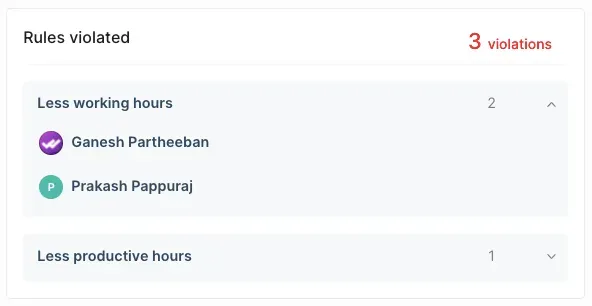
A flag tells you where to look. The table decides which hours were work time; output decides whether the work was done. Keep the two questions apart. Workfolio tracks only while the employee is clocked in, so a worker can log few hours and still have worked them.
When logged hours are high and output is low, go through the day against the table and ask about the stretches that matter for pay. Do not cut hours a worker reported on the strength of output alone. When output is there and logged hours are low, check whether the worker reported the rest.
Pay from the totals and export them
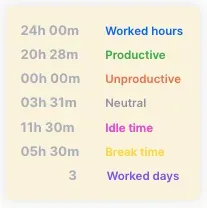
The totals card splits worked hours into productive, unproductive and neutral time, and shows idle time, break time and the worked days beside them. Export your team’s timesheet data to CSV or Excel and calculate payroll the way you want it. In India, if the Code on Wages, 2019 applies to your establishment, you must keep a register of persons employed, the muster roll and wages, in the manner the rules prescribe (s.50(1)).
Put contractor hours in the contract
Check how each worker is classified before you apply the rules above. This post does not settle classification; the contractor post works through it. Whatever the classification, write into the contract what the tracked hours mean for the invoice: which hours are billable, how breaks are treated, and who approves the hours before payment.
Before the first pay run
Before the first tracked day, tell each worker in writing which stretches count as hours worked, how to report hours outside the schedule, and who approves hours before payroll. Then approve the first pay period and check its totals against the timeline for any day that does not match.

