
What happens to the screenshots? Frequency, blurring and who can see them

Screenshots show what was on a screen. They help you check hours and see where a day’s work stalled. They do not show that the work got done, so judge the team on what it ships.
Before install day, settle two things and tell your team: how often screenshots are taken and who on your side can open them.
Say how often screenshots are taken
Ask your tool how often it takes screenshots, and tell your team that figure before anyone is tracked.
Workfolio’s screenshot monitoring captures the whole screen of every display, not the active window. On the Basic plan a screenshot is taken every 10 minutes. On the Pro plan an admin sets the interval, from every minute to every hour. An admin can blur each whole capture, for the organisation or for one person.
Decide who on your side can open screenshots
Each person who can open a screenshot is a place it can leak from. Keep the list short, and put it in your office policy.
Workfolio sets who can open screenshots by role:
- An admin can open everyone’s.
- A team head can open their teams’, unless the admin turns that off for that head.
- An employee can open their own, when the admin allows it.
Workfolio’s staff access your data only when support requires it and you give explicit permission.
Ask any vendor who on its own staff can open your screenshots, and expect a specific answer.
Read a day as a timeline before you open a picture
Workfolio’s daily timeline is a visual log of daily activities for every employee, split into productive time, idle time and break time. Start with the timeline for the day you are checking, and open a screenshot only for the stretch that needs a closer look.
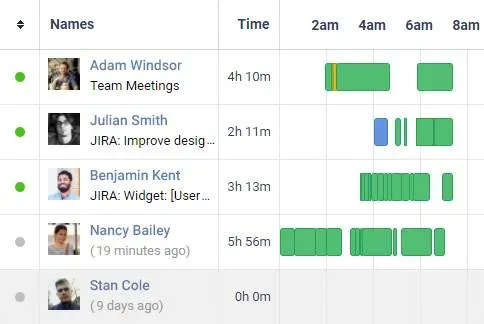
For a closer look, on the Pro plan with a screenshot interval under 10 minutes, Workfolio makes timelapse videos of the work after the day ends.
Check hours, then the rules that flag them
Workfolio tracks employee work time through computer activity, for worked hours that can feed payroll. Worked time runs from clock-in to clock-out less breaks: idle time is inside it, and break time is outside it. The totals card shows worked time, productive, unproductive, neutral, idle time and break time, with the number of worked days.
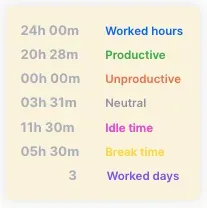
Workfolio’s rules filter employees who are working less, being idle or engaging in unproductive activities.
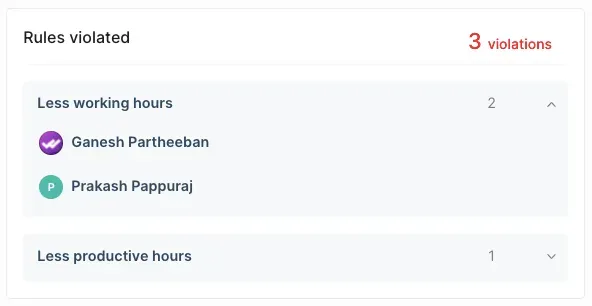
A flag starts a conversation. Check the timeline and the work before you act on it.
Judge the team on what it ships
A screenshot proves what was on a screen. It does not prove the work got done. Use screenshots for what they are good at: checking the worked hours behind payroll, settling a disagreement about what happened, and spotting someone stuck before a deadline slips. Then judge your team on what it ships.
If your screens can show patient data
Workfolio’s HIPAA page says: “Screenshots captured by Workfolio may potentially contain sensitive information, including PHI, depending on what is displayed on an employee’s screen.” A screenshot cannot tell a patient’s chart from a recipe, so assume any screenshot can hold PHI.
Workfolio supports Business Associate Agreements (BAAs) for eligible customers. Request one from the team at the address the HIPAA page gives. A vendor that cannot sign a BAA is not ready for your screenshots.
Tell your team how screenshots work
Tell them the two answers: how often screenshots are taken while work is tracked, and who can open them. Write those answers into your office policy, and send it before the first tracked day.

