 VS
 VS
Workfolio, the ActivTrak and Teramind alternative free for unlimited users
Monitoring, time tracking and attendance in one app, free for unlimited users.
- Free forever. No credit card. Used by 2,500+ teams.

Workfolio vs ActivTrak & Teramind
| ActivTrak | Teramind | Workfolio | |
|---|---|---|---|
| Free Plan | Up to 3 people | No | Yes |
| Apps & website tracking | Yes | Yes | Yes |
| Screenshot tracking | Paid add-on | Yes | Yes |
| Video Records | No | Yes | On Pro |
| Idle time detection | Yes | Yes | Yes |
| Alerts | Yes | Yes | On Pro |
| Detailed Leave management | HR sync add-on | No | On Pro |
| Project management | No | Yes | Yes |
| Offline hours | Yes | No | Yes |
| Productivity tracking | Yes | Yes | Yes |
| API | No | Yes | Yes |
| Blur Screenshots | No | Yes | Yes |
| Email Notifications | Yes | Yes | Yes |
| Short Leaves | No | No | On Pro |
| Tracks time automatically | Yes | Yes | Yes |
| Invoice | No | No | Coming Soon |
| Stealth | Installs silently | Yes | On Pro |
Pricing
USD per user per month
| Billed Monthly | Billed Annually | |
|---|---|---|
| ActivTrak | Not offered | $10.00 |
| Teramind | Not offered | $14.00 |
| Workfolio | $4.99 | $3.99 |
Workfolio in INR: Rs. 299/user/month billed monthly, Rs. 239/user/month billed annually. Prices are before GST, which is added on the invoice.
Trial and screenshots
| Trial Duration | Screenshot Frequency | |
|---|---|---|
| ActivTrak | 14 days | Depends on the add-on you buy |
| Teramind | 7 days | Not stated |
| Workfolio | 14 days; Basic free forever | Every minute, on Pro |
What ActivTrak and Teramind do well
ActivTrak reads how work gets done, for leaders planning teams and tools. Teramind records screens and, on its higher plans, adds keystroke logging and data-loss rules.
ActivTrak's strengths
- Automatic time tracking, on every plan
- Real-time visibility, on Work Activity Tracking
- Productivity insights and trends, on Productivity Optimization
- Offline meeting time, on Work Activity Tracking and up
- Alarm notifications by email, MS Teams, Slack, and to other tools through webhooks, on Work Activity Tracking and Workforce Management
Suits leaders, executives and managers in operations and IT, data analysis, finance, AI strategy, and human resources.
Teramind's strengths
- Smart rules and automated alerts
- Screen recording and live view, on every plan
- Productivity analysis and reporting, on every plan
- Sensitive content redacted, on DLP and Enterprise
- Hidden or visible app, set per team
Suits organizations in financial services, healthcare, call centers and customer service, and federal and government.
What Your Team Gets with Workfolio
App and website use, screenshots, timesheets and a daily timeline for every employee, with lateness and leave on Pro
Monitor the apps your team uses, in realtime
Working hard or browsing social media? Always know how your employees use their time. Track app and website usage, and the share of time on productive apps.

Timesheets of worked hours, filled in for you
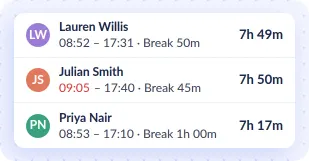
Each employee's hours run from clock-in to clock-out, less breaks, and fill in their timesheet for them.
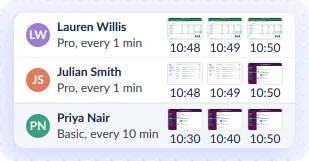
Take screenshots as often as every minute
Capture each employee's whole screen. You can blur the images for privacy.
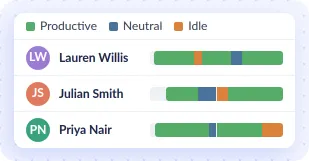
See productivity for every employee on a daily timeline
A visual log of daily activities for every employee, showing time on productive, unproductive and neutral apps, and idle time.
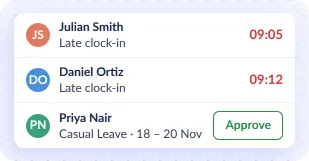
Know Who's Late or on Leave
On Pro, see who clocked in late, approve leave and set your holidays.


ALSO FEATURED IN



More Workfolio Comparisons
Learn how Workfolio outshines other top tools with better features and value
See How Much Workfolio Can Save You
Compare costs side by side
Our pricing is designed to fit any team size.
| Monthly Cost | Total Annual Cost | |
|---|---|---|
| Workfolio Pro $3.99/user, Billed Annually | ||
| ActivTrak Work Activity Tracking $10.00/user, Billed Annually | ||
| Teramind Starter $14.00/user, Billed Annually |
savings annually when using Workfolio over ActivTrak Work Activity Tracking
savings annually when using Workfolio over Teramind Starter
Why Choose Workfolio Over ActivTrak & Teramind?
- Free for Your Whole Team Workfolio's Basic plan is free forever for unlimited users, with up to 10 GB of file storage. ActivTrak's free plan covers up to 3 people, and Teramind has none.
- A Lower Price per User Workfolio Pro is $3.99 a user a month, billed annually. ActivTrak is $10.00 and Teramind $14.00.
- Screenshots You Can Blur Workfolio blurs every screenshot for the whole company or for one person. ActivTrak no longer offers screenshot redaction, and Teramind redacts sensitive content on its DLP and Enterprise plans.
Moving from ActivTrak or Teramind to Workfolio is free.
Our support team does it for you on request in chat. Chat with support
What Our Users Say
Workfolio has transformed our team’s productivity! The ease of tracking and reporting has streamlined our workflow and saved us significant time and money.
 Raha West Operations Manager at TechCorp